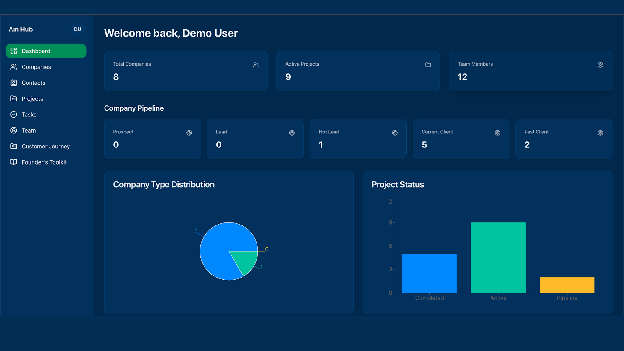
Paying for separate CRM and project-management subscriptions would have drained our budget. We needed one place to handle every lead, project, and student task, so we built it ourselves.
What we needed
- A single list of companies, contacts, and leads
- Projects that link the right people and tasks
- Task lists that sort by project or by team member and show clear priorities
How we did it
Learned the basics
The team spent two days exploring Replit Agent. Everyone practiced turning plain-language requests into small demo apps.
Mapped the relationships
We listed how everything connects: each contact belongs to a company, every company ties to a project, and every task points to both a project and a team member.
Shaped the workspace
We asked for simple task lists that let us filter by project or by person. Replit Agent built the screens while we adjusted labels and colors.
Tested and refined
The second week was all polish: clicking every button, adding sample data, and tightening the flow until it felt smooth.
Launched
At the end of week two, the system went live. Every record now sits in one custom dashboard.
Results
No subscription fees: our tool lives inside our existing workspace.
Made for us: every label and view matches how the Hub actually works.
Easy tweaks: need a new report? One plain-language request and we roll out the change.
Why it matters for Southwest Florida businesses
If our student-faculty team can build a custom workspace in two weeks, imagine what you can do. A boutique can track inventory, a salon can manage appointments, a nonprofit can show donors real-time impact. Start with a clear need, describe it in everyday language, and let an AI builder handle the heavy lifting.
Takeaway
Skip one-size-fits-all apps. Build the tool you really need. We are happy to share what we learned. Feel free to reach out any time.